Posts

Hold and Wait? In dead lock

 Hold and wait  = To ensure that hold and wait never occur in the system we must guarantee. That whenever the process request for a resource, it does not hold and other resource. i) We can process request for a resource to the process that is required for its execution before starting its execution. Problem:- = For eg- If there 3 resources that is required by a process and we have given all the resources before starting execution of the process then there might be a situation that initially we required only two resource and after one hour we want third resource and this will cause starvation for the another process that wants this resource in that waiting time that resource can be allocated to other process and complete there execution.
Circular wait ? In dead lock.

  Set of processer are waiting for each other in a circular fashion.  For eg= there are 3 processes p0,p1,p2  Such that p0 is waiting for the resource held by process p1 and process p1 is waiting for the resource held by process p2 and further process p2 is waiting for the resource held by p0. Methods of handling deadlock  1 Deadlock Prevention. 2 Deadlock Avoidence. 3 Deadlock Detection and Resolution. Deadlock Prevention. = It ensures that the four condition for resource deadlock do not occur simultaneously. This can be done by following methods: (i) We only use the lock for non-shareable resources and if the resource is shareable then we will not use the lock here. (ii) That ensures in case of shareable resources, multiple process can access it at same time. Problem:- = Here the problem is that we can only do it in case of no-shareable resources like printer we can have use mutual exclusion.

Non-Preemptive

  If a process is holding some resource and request other resource that are required and these resources are not available immediately then the resource that current process is holding are preemptive

Type of Array?

  🔹 1. One-Dimensional Array (1D Array) A linear list of elements. Example in Python: python arr = [ 10 , 20 , 30 , 40 ] 🔹 2. Two-Dimensional Array (2D Array) An array of arrays (often used to represent matrices). Example in Python: python arr = [[ 1 , 2 ], [ 3 , 4 ], [ 5 , 6 ]] 🔹 3. Multi-Dimensional Array Arrays with more than two dimensions. Common in scientific computing (e.g., NumPy in Python). Example in Python using NumPy: python import numpy as np arr = np.array([[[ 1 , 2 ], [ 3 , 4 ]], [[ 5 , 6 ], [ 7 , 8 ]]]) 🔹 4. Dynamic Array Arrays that can change size during execution. Example: Python's list , Java’s ArrayList , C++ vector . 🔹 5. Static Array Fixed size, declared at creation. Used in languages like C or C++. Example in C: int arr[ 5 ] = { 1 , 2 , 3 , 4 , 5 }; 🔹 6. Jagged Array (Ragged Array) An array of arrays with different lengths (non-uniform). Example in C#: int [][] arr = new int [ 3 ][]; a...

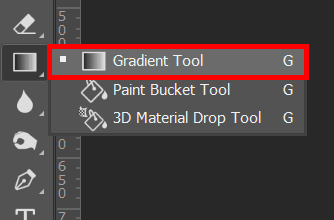
Gradient Tool? In adobe photoshop

Image
  Gradient Tool allows you to specify a gradient of color. Using it is fairly easy, you simply choose the gradient tool from the toolbox click on the canvas and drag out an area to fill with the gradient.

Type tool? Adobe Photoshop

Image
  Type tool used to place text on an image.

Jump to ready image? In adobe photoshop

Image
  Jump to ready image use to easily launch the image ready program.

Switch Screen Mode?

Image
 SWITCH SCREEN MODE Switch screen mode are use to switch full screen and standard screen mode.

Foreground/Background color? in adobe photoshop

Image
 Foreground/Background color Foreground/Background color are use to set the foreground(front) and background(back) colors of an images; can also be use to change color of text, etc. Click on the box to change the color (a new window are appear).

Edit Modes? in adobe photoshop

Image
 Edit Modes  Edit Mode use to switch back forth between modes.

Hand tool? in adobe photoshop

Image
 Hand Tool Hand tool use to quickly view different areas of an image 

Notes Tool? in adobe photoshop

Image
 Notes tool  Notes tool use to leave notes for yourself on your image mymind708.blogspot.com

Path Selection Tool? in adobe photoshop

Image
 Path selection tool  Path selection tool used merge overlapping components into a single component.

Dodge Tool ? in animation or adobe photo shop

Image
  Dodge tool lighten the area of the image. The more you paint over an area with the dodge tool, the lighter it becomes. 

History Brush Tool

Image
 History Brush Tool History brush tool uses a previous state or snapshot of an image. The tool make a copy of the image as was in previous state, then uses the content of the copy to paint with.

Brush tool

Image
  Brush Tool  Brush tool use with the mouse to simply draw the line on your image, paint the image with different shape. 

Crop tool

Image
 Crop Tool Crop tool used for reducing the image to a certain area. mymind708.blogspot.com

Slice Tool?

Image
  Slice Tool Slice tool used to slice an image into different sections; generally used for the creation of image for a web page design mymind708.blogspot.com

Magic Ward Tool?

Image
 Magic Ward Tool Magic ward tool used for auto selecting large areas of an image that is similar in color. mymind708.blogspot.com

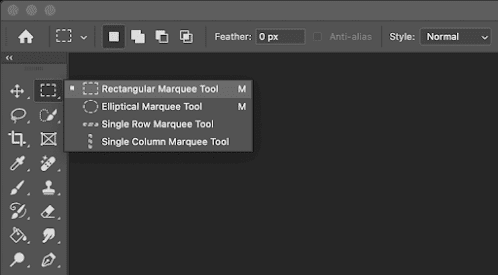
Marque tool?

Image
Marque tool  Marque tool used for for selection areas of an image. This tool is used to draw selections based on geometric shapes. Specifically, the marque tool allows you to draw rectangular and elliptical selections. To from the selections, simply Clicks and drag the mouse  mymind708.blodspot.com